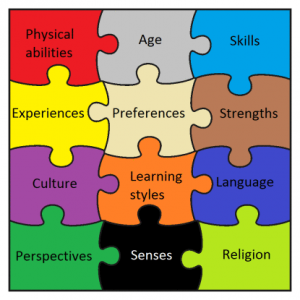
 As stated in last week’s blog, Universal Design principles are intended to make a product, environment, or service accessible to all individuals – with a wide range of characteristics – by removing barriers proactively. The barriers can be in architectural design, as was the first area where Universal Design was applied, but also in education. The goal of Universal Design in education is to “…maximize the learning of students with a wide range of characteristics by applying UD principles to all aspects of instruction (e.g., delivery methods, physical spaces, information resources, technology, personal interactions, assessments).”[i]
The original Universal Design architectural principles, each followed by an example of how to apply these principles in education, are:
- Equitable use. The design is useful to people with diverse abilities. Example: A professor’s website is designed so that it is accessible to everyone, including students who are blind and use text-to-speech software.
- Flexibility in use. The design accommodates a wide range of individual preferences and abilities. Example: A museum, visited as a field trip for a course, allows each student to choose to read or listen to a description of the displays.
- Simple and intuitive use. Use of the design is easy to understand, regardless of the user’s experience, knowledge, language skills, or current concentration level. Example: Control buttons on science equipment are labeled with text and symbols that are simple and intuitive to understand.
- Perceptible information. The design communicates necessary information effectively to the user, regardless of ambient conditions or the user’s sensory abilities. Example: A video shown during class includes captions.
- Tolerance for error. The design minimizes hazards and the adverse consequences of accidental or unintended actions. Example: Educational software provides guidance and background information when the student makes an inappropriate response.
- Low physical effort. The design can be used efficiently, comfortably, and with a minimum of fatigue. Example: Doors to a lecture hall open automatically for people with a wide variety of physical characteristics.
- Size and space for approach and use. Appropriate size and space is provided for approach, reach, manipulation, and use regardless of the user’s body size, posture, or mobility. Example: A flexible science lab work area has adequate workspace for students who are left- or right-handed and for those who need to work from a standing or seated position.[ii]
Two additional principles added specifically regarding education are:
- A community of learners. The instructional environment promotes interaction and communication among students and between students and faculty.
- Instructional climate. Instruction is designed to be welcoming and inclusive. High expectations are espoused for all students.[iii]
Faculty can implement these principles in teaching strategies they use, the instructional materials they require or provide, classroom setup and facilities, and activities and field trips. This is intended to benefit not just students with disabilities, but students with varying learning styles, language skills, backgrounds, interests, and levels of motivation, among other differences.
Some suggestions for faculty on applying Universal Design to their teaching:
- Include a statement in your syllabus inviting students to talk with you and/or Student Accessibility Services about disability-related issues.
- Point out campus resources available to all students such as the Academic Resource Center, Tutoring Center, Writing Center, and Counseling and Health Centers.
- Clearly and early in a course, define course requirements, announce the dates of exams, and tell students when assignments are due. Avoid last-minute readings or additional assignments and provide advance notice of changes in assignments and due dates.
- Provide printed materials early to allow students sufficient time to read and comprehend the material. Many students with learning disabilities use software that can read the textbook and other text-based materials aloud. In order for them to take advantage of this technology, the printed text must first be converted into an electronic file; this process can be time-consuming.
- Use multi-modal methods to present classroom material in order to address a variety of learning styles and strengths (e.g., auditory, visual, kinesthetic). Provide important information in both oral and written formats.
- When teaching a lesson, state objectives, review previous lessons, and summarize periodically. Repeat important information several times.
- Use more than one way to demonstrate or explain information. Draw pictures, charts, or use other visual representations when possible.
- Read aloud what you write on the board or present an overhead visual. Allow time to copy before erasing and/or allow students to take a picture with their phones.
- Keep instructions brief and uncomplicated. Repeat them word-for-word.
- Allow time for clarification of directions and essential information.
- Use captioned videos and know how to turn on the captioning feature. Although captioned videos are typically used for students who are hearing impaired, they also help some students with learning disabilities and those for whom English is a second language by ensuring content is presented visually and audibly. Give all students an opportunity to view a video multiple times (e.g., by making it available in a library or on Moodle).
- Provide study guides or review sheets.
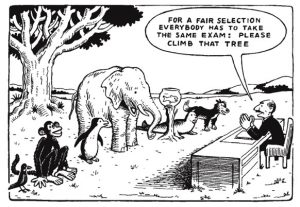
- Have multiple methods for assessment, such as allowing students to take an exam or write a paper; work alone or in a group; or deliver an oral, written, or videotaped project presentation.
- Stress organization and ideas rather than mechanics when grading in-class writing assignments and assessments.[iv]
Endnotes:
[i] Sheryl Burgstahler, “Universal Design of Instruction (UDI): Definition, Principles, Guidelines, and Examples,” DO-IT (Disabilities, Opportunities, Internetworking, and Technology) University of Washington, Accessed Feb. 16, 2017, http://www.washington.edu/doit/universal-design-instruction-udi-definition-principles-guidelines-and-examples .
[ii] Ibid.
[iii] “Nine Principles of UDI,” University of Connecticut Neag School of Education Center on Postsecondary Education and Disability/Center for Students with Disabilities, Accessed Feb. 19, 2017, http://udi.uconn.edu/index.php?q=node/12 .
[iv] Adapted from “Academic Accommodations for Students with Learning Disabilities,” DO-IT (Disabilities, Opportunities, Internetworking, and Technology) University of Washington, Accessed Feb. 19, 2017, http://www.washington.edu/doit/sites/default/files/atoms/files/Academic-Accommodations-Learning-Disabilities.pdf .
