Motivation to Learn

the word MotivationAll students are motivated.  As educators, we hope it’s to be deeply involved in the learning process . . . but that’s not always the case.  College students have competing interests that vie for their attention, time, and efforts.  They have more access to independence, lack of supervision, and choice than they probably ever had before.  Add in the constant presence of their peers and a range of opportunities for fun, and academics might not always make it to the top of the list.

Students who have struggled with learning – whether throughout their schooling or beginning later on as work became more challenging – may struggle with motivation regarding academics.  We think of college as a “choice,” however for some it does not feel that way, whether due to parental pressure or simply knowing that it takes a college degree to have many career options open to you.  Some love the idea of college, but the reality doesn’t live up to their fantasies.  Some just don’t feel ready for what they encounter academically and/or otherwise.  The difference between high school and college expectations is frequently cited by those with learning or attention-related disabilities as a major challenge for them in college.

Numerous theories offer explanations as to what impacts motivation.  Maslow’s hierarchy of needs helps explain why students who aren’t eating or sleeping well aren’t in the best condition to focus on learning.  Nor are students who feel like they are not in a place that is emotionally safe for them.  Nor are students who are preoccupied with friendships and relationships.  And, even for students who want to learn, their motivation to protect their image and the need to shield themselves from embarrassment could easily trump their willingness to take risks, which involves the potential for mistakes and failure.  To paraphrase Richard Lavoie, an educator who specializes in students with learning and attention issues:  adolescents would much rather be thought of as “bad or lazy” than “dumb.”

Another approach to looking at students’ motivation helps explain this.  A student will first look at the value they personally see in a goal – what will they get out of achieving this goal?  Is it intrinsically enjoyable, does it get them closer to a larger goal, does it get them a reward or praise, etc.? Motivation is increased when an individual finds personal value in the goal.  Then, they will look at the likelihood that they will be successful in achieving the goal.   Motivation is also impacted by their sense of self-efficacy, their perceived likelihood of success in achieving the goal.  This is where a student’s past greatly affects their current level of motivation.  A student with a history of struggling academically – or with certain types of academics (“I’m no good at math” or “I can’t learn a foreign language”) – is more likely to assume those struggles will continue.  They feel, “Why bother? It’s a waste of my time.”

Another critical factor that impacts motivation is the student’s perception of the supportiveness of the environment. Their perception, not ours.  He or she will consider the tone of the classroom or learning environment, the interpersonal dynamics with others (faculty, staff, fellow students), and the nature and structure of the communication – are others approachable or hostile, patient or impatient, judgmental or understanding, etc.?  Supportiveness of the environment doesn’t only mean what’s going on at the college, but also the family dynamics at play (I have seen college students make choices for the primary reason of sending a message to their parents).

When a student sees value in a learning goal, feels that there is a good likelihood of success in achieving it, and views the environment as supportive, that is when motivation to learn is most optimal.  Any negative perceptions regarding these factors, and the student can develop a sense of fragility, hopelessness, avoidance, or rejection; motivation toward the learning goal is reduced, sometimes greatly.

Next week we will look at some ways to help students perceive value in a learning goal and to increase their expectation of success for themselves.


Applying Principles of Universal Design in the Classroom

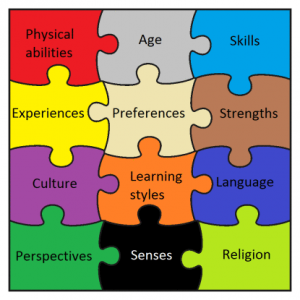
UD PuzzleAs stated in last week’s blog, Universal Design principles are intended to make a product, environment, or service accessible to all individuals – with a wide range of characteristics – by removing barriers proactively.  The barriers can be in architectural design, as was the first area where Universal Design was applied, but also in education.  The goal of Universal Design in education is to “…maximize the learning of students with a wide range of characteristics by applying UD principles to all aspects of instruction (e.g., delivery methods, physical spaces, information resources, technology, personal interactions, assessments).”[i]

The original Universal Design architectural principles, each followed by an example of how to apply these principles in education, are:

  1. Equitable use. The design is useful to people with diverse abilities. Example: A professor’s website is designed so that it is accessible to everyone, including students who are blind and use text-to-speech software.
  2. Flexibility in use. The design accommodates a wide range of individual preferences and abilities. Example: A museum, visited as a field trip for a course, allows each student to choose to read or listen to a description of the displays.
  3. Simple and intuitive use. Use of the design is easy to understand, regardless of the user’s experience, knowledge, language skills, or current concentration level. Example: Control buttons on science equipment are labeled with text and symbols that are simple and intuitive to understand.
  4. Perceptible information. The design communicates necessary information effectively to the user, regardless of ambient conditions or the user’s sensory abilities. Example: A video shown during class includes captions.
  5. Tolerance for error. The design minimizes hazards and the adverse consequences of accidental or unintended actions. Example: Educational software provides guidance and background information when the student makes an inappropriate response.
  6. Low physical effort. The design can be used efficiently, comfortably, and with a minimum of fatigue. Example: Doors to a lecture hall open automatically for people with a wide variety of physical characteristics.
  7. Size and space for approach and use. Appropriate size and space is provided for approach, reach, manipulation, and use regardless of the user’s body size, posture, or mobility. Example: A flexible science lab work area has adequate workspace for students who are left- or right-handed and for those who need to work from a standing or seated position.[ii]

Two additional principles added specifically regarding education are:

  1. A community of learners. The instructional environment promotes interaction and communication among students and between students and faculty.
  2. Instructional climate. Instruction is designed to be welcoming and inclusive. High expectations are espoused for all students.[iii]

Faculty can implement these principles in teaching strategies they use, the instructional materials they require or provide, classroom setup and facilities, and activities and field trips.  This is intended to benefit not just students with disabilities, but students with varying learning styles, language skills, backgrounds, interests, and levels of motivation, among other differences.


Some suggestions for faculty on applying Universal Design to their teaching:

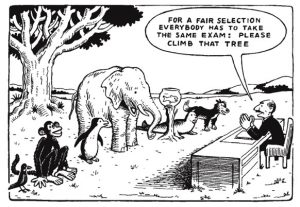
Cartoon showing variety of animals who must climb a tree as a test

  • Include a statement in your syllabus inviting students to talk with you and/or Student Accessibility Services about disability-related issues.
  • Point out campus resources available to all students such as the Academic Resource Center, Tutoring Center, Writing Center, and Counseling and Health Centers.
  • Clearly and early in a course, define course requirements, announce the dates of exams, and tell students when assignments are due. Avoid last-minute readings or additional assignments and provide advance notice of changes in assignments and due dates.
  • Provide printed materials early to allow students sufficient time to read and comprehend the material. Many students with learning disabilities use software that can read the textbook and other text-based materials aloud. In order for them to take advantage of this technology, the printed text must first be converted into an electronic file; this process can be time-consuming.
  • Use multi-modal methods to present classroom material in order to address a variety of learning styles and strengths (e.g., auditory, visual, kinesthetic). Provide important information in both oral and written formats.
  • When teaching a lesson, state objectives, review previous lessons, and summarize periodically. Repeat important information several times.
  • Use more than one way to demonstrate or explain information. Draw pictures, charts, or use other visual representations when possible.
  • Read aloud what you write on the board or present an overhead visual. Allow time to copy before erasing and/or allow students to take a picture with their phones.
  • Keep instructions brief and uncomplicated. Repeat them word-for-word.
  • Allow time for clarification of directions and essential information.
  • Use captioned videos and know how to turn on the captioning feature. Although captioned videos are typically used for students who are hearing impaired, they also help some students with learning disabilities and those for whom English is a second language by ensuring content is presented visually and audibly. Give all students an opportunity to view a video multiple times (e.g., by making it available in a library or on Moodle).
  • Provide study guides or review sheets.
  • Have multiple methods for assessment, such as allowing students to take an exam or write a paper; work alone or in a group; or deliver an oral, written, or videotaped project presentation.
  • Stress organization and ideas rather than mechanics when grading in-class writing assignments and assessments.[iv]

Endnotes:

[i] Sheryl Burgstahler, “Universal Design of Instruction (UDI):  Definition, Principles, Guidelines, and Examples,” DO-IT (Disabilities, Opportunities, Internetworking, and Technology) University of Washington, Accessed Feb. 16, 2017, http://www.washington.edu/doit/universal-design-instruction-udi-definition-principles-guidelines-and-examples .

[ii] Ibid.

[iii] “Nine Principles of UDI,” University of Connecticut Neag School of Education Center on Postsecondary Education and Disability/Center for Students with Disabilities, Accessed Feb. 19, 2017, http://udi.uconn.edu/index.php?q=node/12 .

[iv] Adapted from “Academic Accommodations for Students with Learning Disabilities,” DO-IT (Disabilities, Opportunities, Internetworking, and Technology) University of Washington, Accessed Feb. 19, 2017, http://www.washington.edu/doit/sites/default/files/atoms/files/Academic-Accommodations-Learning-Disabilities.pdf .

Looking to K-12 to Help Develop “Full Participation” in the Classroom

closeup of colorful crayon tips

There has been focus and discussion here at Conn regarding “full participation” in all aspects of the College, including in the classroom.  The working definition of full participation we are using is from Susan Sturm:

Full participation is an affirmative value focused on creating institutions that enable people, whatever their identity, background, or institutional position, to thrive, realize their capabilities, engage meaningfully in institutional life, and contribute to the flourishing of others.   http://wordpress.conncoll.edu/connections/full-participation/

Interestingly, this is very similar language used by educators who focus their work on teaching students with learning disabilities.

In fact, students today come to college very familiar with this notion of full participation because this concept has been applied in K-12 classrooms since before they were born.  Today’s K-12 teachers are expected to reach and teach all of their students, with most special education occurring in the classroom as well.  The range is huge – students with intellectual impairments, students with learning disabilities, students who are underprepared, English Language Learners, typical learners, gifted learners, etc.  The way that K-12 teachers do this is through what is called “differentiation.”   This essentially entails determining where a student is academically and then how to support each and every student – bringing those who need remediation up to speed and challenging and pushing those who are advanced beyond grade level, and everything in between.

DifferentiationDifferentiated instruction requires a teacher to vary his or her approach to each student by customizing content, teaching techniques, learning strategies, and assessment tools.  In order to do this, instructors need to identify the learning outcomes they want students to achieve, must understand how each student learns best, and then design differentiated instructional approaches and assessments.  If they’ve tried something that doesn’t work, they go through the process again to adjust and adapt the learning experience for the student.  Sounds like a lot of work?  It is (not to mention adding classroom management and developing social skills into the mix) . . . thank your K-12 teachers!

We can use some of these same approaches that have been applied during students’ K-12 years to teaching students in college.  A significant step in this direction that has gotten attention at Conn is in applying principles of universal design for learning (also referred to as universal design for instruction).  Universal design for learning is a framework based on the philosophy of inclusion – making learning accessible to all students, addressing diverse needs, interests, and abilities.  Universal design for learning provides for different methods for students to take in information and to demonstrate what they know.  The approach increases student motivation, which contributes significantly to improved learning.

Universal design originated in architectural design, making physical space accessible to all, both those with and without disabilities.  In the same vein, universal design applied to learning is meant to benefit all students, with and without disabilities.  In addition to this benefit for all, a particular benefit for students with disabilities is that it can greatly reduce their need to ask for accommodations when access is given to all from the outset.

Next week we will focus on some specific examples of applying universal design for instruction and learning in the classroom.


The Accommodation of Access to Notes & How Faculty Can Make Notes More Accessible

pen resting on pad of paperA student with the accommodation of “access to notes” might have qualified for the accommodation due to a visual or hearing impairment, an attentional issue, a processing difficulty, or a struggle with working memory.  There are different ways of providing this access depending upon the individual’s functional limitations, therefore an Accommodation Memo might list “use of a recording device” or “access to a peer note taker.”  There are also variations that include “copy of teacher notes” or “copy of PowerPoint slides in advance.”
The reason for the note taking assistance is that something about the individual’s disability impacts his or her ability to create a set of notes that documents important information from class.  The level of impact varies, and the accommodation should be in line with the extent that the individual’s note-taking capacity is limited.  Student Accessibility Services is working toward customizing this, looking at each student’s ability to take notes and what he or she needs to be able to create notes at the same level as students without disabilities.

For example, many students with disabilities take notes in class, however due to a slower processing speed or attentional issues, may miss some information during the lecture or discussion.  For these students, the accommodation of “use of a recording device” is ideal because the recording allows the student to go back later and fill in the missing information.  There are technology devices – referred to as assistive technology – that can make this very easy and efficient for students.  Assistive technology refers to a device or program that allows those with disabilities to enhance their functionality and increase their independence.

Two pieces of assistive technology for note taking, which are available for students to borrow from the SAS office, are the Livescribe Smart Pen and Sonocent Audio Notetaker program.  The Smart Pen is used in conjunction with a special notebook that includes markings on it to start and stop the pen’s recording; there are also markings on the page that align the recording with where your written notes are on the page.  So, a student touches the spot on the page where she missed something in the notes, and she can listen back and fill in her notes.  Or, a student can just listen back to a part of the lecture that was unclear or challenging.

Sonocent Audio Notetaker works in a similar way, but is a computer program.  The lecture is recorded through the student’s laptop, and the student’s typed notes are aligned with the recording.  If something is missed in the notes – just click in that spot and that part of the lecture is replayed.  There are also tablet and smartphone apps that perform similar tasks.

For many students with disabilities, the use of assistive technology enables them to take their own notes, with the technology able to compensate for their functional limitations.  The benefit is that students are able to make a complete set of notes independently and do not have to rely upon another student’s judgment as to what was important enough to include in notes.  Also, another student may already know or understand something and therefore not include that in their notes.  Taking your own notes with technology assistance avoids these issues.

The accommodation of a peer note taker is intended for a student who cannot make a set of usable notes independently that can then be supplemented with the use of assistive technology.  The peer note taker is still intended to supplement the student’s own notes to the extent that the student can take his or her own notes independently.

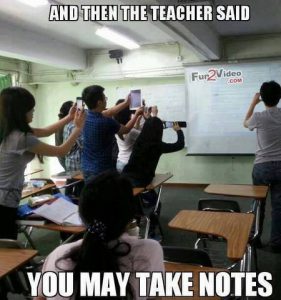
There are some ways that faculty can proactively make class notes more accessible for all students (following principles of universal design for instruction).  One is by putting your own notes (or a skeletal outline for students to fill in) onto Moodle, so that all students in class can use those to compare to their own notes – students will fill in their own notes or rely on the teacher’s notes as needed.  students in classroom taking picture of boardThis can be especially helpful in classes with mathematical problems where it may be hard for students to accurately or quickly copy what the teacher is writing on the board, and a recording of such may not be very useful when the primary intake is visual.  A second is to have a dedicated class note taker (class members can take turns) who posts his or her notes on Moodle for the rest of the class to review and compare to their own notes.  A third is to record the class – audio or video – and post the recording on Moodle.  And finally, a simple method is to allow students to take a picture of the board with their phones if you’ve written a lot of information, drawn a diagram or chart, or solved a math problem that may be hard to recreate in their notes.
Faculty and staff members who are interested in learning more about assistive technology can contact Lillian Liebenthal at x5428.


Concerns About Recordings

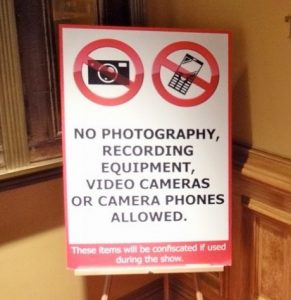
No photography, no recording signSome faculty members worry that recordings stifle class discussions or may be misused.  First and foremost, §504 of the Rehabilitation Act of 1973 doesn’t mention many specific accommodations, but it does explicitly state “use of tape recorder” as an example of providing access when necessary for an individual with a disability.  So, like it not, it’s one of the few things that the law explicitly includes.  Secondly, if there is a sensitive topic being discussed, students who are recording can be told to stop – as long as students taking written notes are told not to take notes at that time (remember, it’s about equal access, so if no students can take notes, then students with a note taking accommodation don’t get to either).  Thirdly, our Use of Recording Device policy and agreement address appropriate use of recordings – click on the links to read the limitations of the use of the recordings and consequences for misuse of recordings.